

Tech & Marketing | Al-Powered Content & Growth | Helping Brands | Grow With Automation & Strategy | 📩 DM for paid promotion | 📩 samcoderx3@gmail.com |
Australia
- Tweets 13,579
- Following 444
- Followers 2,474
- Likes 19,864




Pinned Tweet

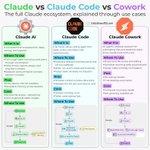
🚨 THE CLAUDE AI CHEAT SHEET YOU’LL WISH YOU HAD SAVED EARLIER.
If you use Claude only to ask questions and generate text, you’re using only a small part of what the Claude ecosystem can offer.
Claude can be used for reasoning, writing, coding, research, projects, artifacts, connectors, automation, and structured workflows.
The real advantage isn’t knowing hundreds of prompts.
It’s knowing how to structure the work.
Here’s the cheat sheet I’d keep bookmarked 👇

20
14
33
968

💸 STOP OVERPAYING FOR TOOLS — TRY THESE FREE ALTERNATIVES
Why spend money on expensive subscriptions when free alternatives can handle many of the same everyday tasks? 👇
🎬 Netflix → NetMirror
🎵 Spotify → Jango
🎧 Apple Music → Demus
🤖 ChatGPT → Compass
📊 Microsoft Office → LibreOffice
🎨 Midjourney → Higgsfield
🖌️ Canva → Vectr
✨ Gemini → Misty
📺 Disney+ → Tubi
📺 Hulu → Pluto TV
🎮 Xbox Game Pass → Epic Games Store
📚 Kindle → Wattpad
📧 Gmail → Proton Mail
🎨 Figma → Gravit Designer
▶️ YouTube → Rumble
✍️ Grammarly → Ginger
📝 Notion → Obsidian
🖼️ Photoshop → Photopea
🔗 Useful Links
[LibreOffice](libreoffice.org/?utm_source=…)
[Higgsfield](higgsfield.ai/?utm_source=ch…)
[Vectr](vectr.com/?utm_source=chatgp…)
[Tubi](tubitv.com/?utm_source=chatg…)
[Pluto TV](pluto.tv/?utm_source=chatgpt…)
[Epic Games Store](store.epicgames.com/?utm_sou…)
[Wattpad](wattpad.com/?utm_source=chat…)
[Proton Mail](proton.me/mail?utm_source=ch…)
[Rumble](rumble.com/?utm_source=chatg…)
[Ginger](gingersoftware.com/?utm_sour…)
[Obsidian](obsidian.md/?utm_source=chat…)
[Photopea](photopea.com/?utm_source=cha…)
💡 Save this post — you’ll thank yourself later.
🔁 Share it with someone who loves finding free tools.
Follow @bytecarter_x for more AI tools, free apps & productivity hacks.

2
3
5
228
S A M retweeted
💸 STOP OVERPAYING FOR TOOLS — TRY THESE FREE ALTERNATIVES
Why spend money on expensive subscriptions when free alternatives can handle many of the same everyday tasks? 👇
🎬 Netflix → NetMirror
🎵 Spotify → Jango
🎧 Apple Music → Demus
🤖 ChatGPT → Compass
📊 Microsoft Office → LibreOffice
🎨 Midjourney → Higgsfield
🖌️ Canva → Vectr
✨ Gemini → Misty
📺 Disney+ → Tubi
📺 Hulu → Pluto TV
🎮 Xbox Game Pass → Epic Games Store
📚 Kindle → Wattpad
📧 Gmail → Proton Mail
🎨 Figma → Gravit Designer
▶️ YouTube → Rumble
✍️ Grammarly → Ginger
📝 Notion → Obsidian
🖼️ Photoshop → Photopea
🔗 Useful Links
[LibreOffice](libreoffice.org/?utm_source=…)
[Higgsfield](higgsfield.ai/?utm_source=ch…)
[Vectr](vectr.com/?utm_source=chatgp…)
[Tubi](tubitv.com/?utm_source=chatg…)
[Pluto TV](pluto.tv/?utm_source=chatgpt…)
[Epic Games Store](store.epicgames.com/?utm_sou…)
[Wattpad](wattpad.com/?utm_source=chat…)
[Proton Mail](proton.me/mail?utm_source=ch…)
[Rumble](rumble.com/?utm_source=chatg…)
[Ginger](gingersoftware.com/?utm_sour…)
[Obsidian](obsidian.md/?utm_source=chat…)
[Photopea](photopea.com/?utm_source=cha…)
💡 Save this post — you’ll thank yourself later.
🔁 Share it with someone who loves finding free tools.
Follow @bytecarter_x for more AI tools, free apps & productivity hacks.
2
3
5
228
🚨 THE CLAUDE AI CHEAT SHEET YOU’LL WISH YOU HAD SAVED EARLIER.
If you use Claude only to ask questions and generate text, you’re using only a small part of what the Claude ecosystem can offer.
Claude can be used for reasoning, writing, coding, research, projects, artifacts, connectors, automation, and structured workflows.
The real advantage isn’t knowing hundreds of prompts.
It’s knowing how to structure the work.
Here’s the cheat sheet I’d keep bookmarked 👇
20
14
33
968
🔥 THE BIGGEST LESSON
The best Claude users aren't necessarily the people who know the most prompts.
They're the people who know how to give Claude:
CONTEXT
+
CLEAR INSTRUCTIONS
+
EXAMPLES
+
TOOLS
+
A DEFINED WORKFLOW
That's when Claude goes from:
“AI that answers questions”
to:
“AI that actually helps me get work done.”
Save this cheat sheet. 🔖
Follow @samcoderx for daily AI tools, prompts, workflows, and practical AI content.
1
19
⚡ 14 — PRO TIPS THAT ACTUALLY MATTER
Give Claude context.
Don't make it guess.
Give examples.
Especially when style matters.
Define the output.
Tell it whether you want a table, bullets, JSON, report, etc.
Use projects for recurring work.
Don't rebuild the same context every time.
Use the right model for the task.
Simple task ≠ maximum reasoning required.
Ask Claude to critique its own work.
A second review pass can catch weaknesses.
Break complicated work into stages.
Research → Analyze → Draft → Review → Finalize.
Use AI as a workflow.
Not just a question-answer machine.
1
20
🎓 13 — LEARN FROM OFFICIAL RESOURCES
Don't just collect prompts.
Learn the fundamentals:
→ Prompting
→ Projects
→ Artifacts
→ Claude Code
→ API usage
→ Connectors
→ Advanced workflows
Once you understand the underlying workflow, you can create your own prompts instead of copying someone else's.
1
16
🚀 12 — 10 PROMPT STARTERS YOU CAN STEAL
1.
“Act as [role] and help me [task].”
2.
“Explain [topic] like I’m a complete beginner.”
3.
“Compare [X] vs [Y] based on [criteria].”
4.
“Rewrite this in a more [tone] style.”
5.
“Find the 5 biggest problems with this document.”
6.
“Create a step-by-step plan to achieve [goal].”
7.
“Summarize this into 3 key points.”
8.
“Generate 10 ideas for [topic] and rank them.”
9.
“Debug this code and explain the root cause.”
10.
“Review this output against these requirements and improve anything that doesn't meet them.”
Save these. You'll use them constantly.
1
9
🛠️ 11 — KNOW THE CLAUDE ECOSYSTEM
Depending on your platform and availability, Claude can be accessed through different products and workflows.
Think broadly:
🧠 Claude AI → General AI assistant
💻 Claude Code → Coding/engineering
⚙️ Cowork → Desktop/workflow automation
📱 Mobile → AI on the go
🖥️ Desktop → Full workspace experience
🔌 API → Build Claude into your own applications
Choose the interface based on what you're actually trying to accomplish.
1
30
⚙️ 10 — SKILLS + HOOKS + AUTOMATION
For advanced workflows, reusable instructions and automation can reduce repetitive setup.
The basic idea:
Define the workflow once → reuse it repeatedly.
Instead of explaining the same process every time, create reusable instructions, templates or workflows around the tasks you perform frequently.
This is where AI starts becoming a system, not just a chatbot.
1
12
💻 09 — CLAUDE CODE FOR REAL SOFTWARE WORK
If you're a developer, Claude Code is a completely different workflow from normal chat.
It can help with:
→ Understanding codebases
→ Editing files
→ Implementing features
→ Debugging
→ Running tests
→ Refactoring
→ Reviewing changes
→ Working through development tasks
Instead of:
“Write me a function.”
You can approach the problem at the project level:
“Analyze this codebase, find the issue, implement the fix, run the relevant tests, and explain what changed.”
That's a much more powerful workflow.
1
21
🔌 08 — CONNECT CLAUDE TO YOUR WORKFLOW
Connectors can bring external tools and information into your workflow.
Depending on what is available to you, that can include tools such as:
→ Google Drive
→ Gmail
→ Calendar
→ Slack
→ GitHub
→ Figma
→ Notion
→ Other supported services
The goal is simple:
Stop manually moving information between every application.
Let Claude work with the relevant context when appropriate.
1
23
🎨 07 — USE ARTIFACTS FOR THINGS YOU WANT TO BUILD
Artifacts can be useful when the output is more than plain text.
Think:
→ Interactive documents
→ Code
→ Visualizations
→ HTML
→ Structured content
→ Components
→ Prototypes
Instead of simply receiving an explanation, you can sometimes have Claude create something you can inspect, iterate on and use.
1
13
🎨 07 — USE ARTIFACTS FOR THINGS YOU WANT TO BUILD
Artifacts can be useful when the output is more than plain text.
Think:
→ Interactive documents
→ Code
→ Visualizations
→ HTML
→ Structured content
→ Components
→ Prototypes
Instead of simply receiving an explanation, you can sometimes have Claude create something you can inspect, iterate on and use.
1
12
📁 06 — USE PROJECTS FOR LONG-TERM WORK
Don't keep everything inside random conversations.
Use Projects to organize work around a specific:
→ Client
→ Topic
→ Business
→ Content pipeline
→ Research project
→ Product
Add relevant files and project instructions so Claude has the necessary context.
This is especially useful when you're working on something over multiple sessions.
2
8
🧩 05 — ZERO-SHOT vs ONE-SHOT vs FEW-SHOT
This is one of the most useful prompting concepts.
Zero-shot
Give Claude the task directly.
“Write 15 CTAs for this product.”
One-shot
Give one example of what you want.
“Write 15 CTAs in this style. Example: [example].”
Few-shot
Give several examples.
“Here are 3 examples of the style I want: [examples]. Create 15 more following the same pattern.”
When consistency matters, examples can be extremely useful.
If Claude keeps missing your preferred style, stop repeating the instruction and give it examples.
1
11
🔥 04 — CHOOSE THE RIGHT PROMPT STYLE
Different problems need different prompt structures.
Open-ended
Use when you want exploration.
“Give me 10 possible approaches…”
Comparative
Use when choosing between options.
“Compare X vs Y based on cost, difficulty and scalability.”
Instructional
Use when you want Claude to teach you.
“Explain this like I’m a beginner.”
Feedback
Use when improving existing work.
“Review this and identify the 5 biggest weaknesses.”
Scenario-based
Use when you want strategic thinking.
“Imagine you are launching this product with a $5,000 budget…”
1
14
🎯 03 — GIVE CLAUDE A ROLE + TASK + FORMAT
A simple formula:
ACT AS [ROLE]
PERFORM [TASK]
RETURN IT IN [FORMAT]
Examples:
Act as a marketing strategist.
Create a launch strategy.
Return it as a table.
Act as a senior developer.
Debug this code.
Return the corrected code + explanation.
Act as a career coach.
Analyze my resume.
Return the top 10 improvements as bullet points.
This gives Claude a clear job description instead of a vague request.
1
20
✍️ 02 — MASTER THE BASIC PROMPTING TECHNIQUES
A good prompt isn't necessarily long.
It should be specific.
Useful techniques include:
→ Role prompting
→ Providing examples
→ Step-by-step instructions
→ Giving context
→ Defining the desired style
→ Chaining multiple tasks
→ Asking for structured output
→ Comparing alternatives
One of the most reliable combinations:
Role + Context + Examples + Task + Output Format
Instead of:
“Write a marketing strategy.”
Try:
“Act as a senior marketing strategist. Here is my product and target audience: [context]. Analyze the biggest growth opportunities and create a 30-day strategy. Return it as a table with goals, actions, metrics and priorities.”
More clarity → less guessing → better output.
1
17
🧠 01 — KNOW WHICH CLAUDE MODELS FIT THE JOB
Different models are designed for different workloads.
Think in terms of:
Deep reasoning → difficult analysis, complex problems, research
Balanced everyday work → writing, editing, coding, analysis
Fast tasks → simple questions, quick transformations, lightweight work
Don’t automatically use the most powerful model for every tiny task.
Match the model to the complexity of the problem.
1
24
