

Sharing insights Al | No-Code, Tech Tools & prompts | Content Creator | Education & Career Influencer | 📩 Email or DM Collaboration: raselhossen4504@gmail.com
Dhaka, Bangladesh
- Tweets 42,243
- Following 1,021
- Followers 5,783
- Likes 32,890









Pinned Tweet

You don't need 10 AI tools to create better content.
You only need 2:
🧠 Claude
🎨 Canva
Here's the workflow. 🧵👇

16
18
29
327
Rasel Hossen retweeted
You don't need 10 AI tools to create better content.
You only need 2:
🧠 Claude
🎨 Canva
Here's the workflow. 🧵👇
16
18
29
327
Rasel Hossen retweeted
The internet has hidden levels most people never explore.
You can:
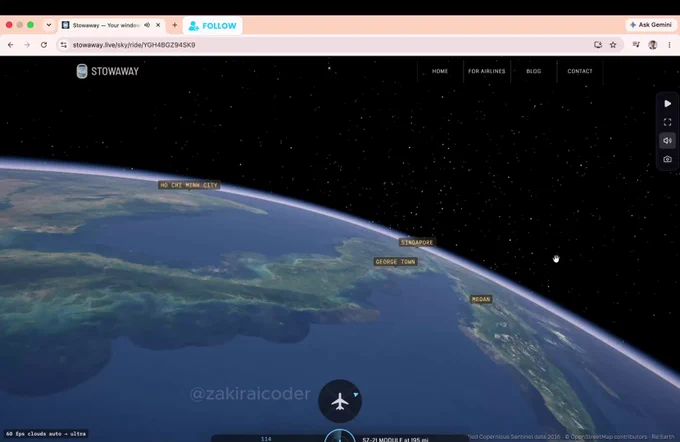
1. Watch Earth change in real time
2. Follow planes across the planet
3. Track ships crossing oceans
4. Watch lightning strikes happen
5. Explore the universe in 3D
6. Travel through centuries-old maps
7. Visit museums from your bedroom
8. Read thousands of free books
9. Explore humanity through real data
10. Discover forgotten art & history
And this is just the surface.
The best part?
Most of these are completely free.
Save this thread. 🔖
Follow @Tech_AI_Rasel for more hidden websites, AI tools & tech resources.
16
17
33
574
Rasel Hossen retweeted
You’re probably using AI wrong.
Most people treat AI like Google.
Here’s how to turn it into your personal productivity system. 🧵👇
1
1
3
93
Rasel Hossen retweeted

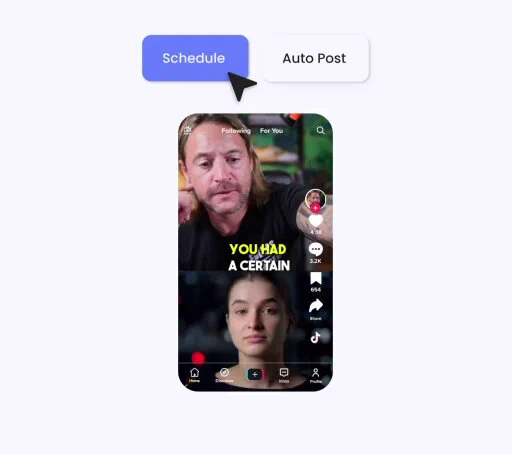
One piece of content ~ Multiple platforms ~ One streamlined workflow⚡
🎁FREE AI AUTOMATION WORKFLOW
Want to save hours every week on content creation?
I’m sharing this powerful workflow that helps you:👇
⚡ Create content once
🔄 Repurpose it across multiple platforms
📅 Automate scheduling & publishing
⏳ Save hours of repetitive work
Want the workflow?
1️⃣ Follow me @mostofakamal00
2️⃣ Like ❤️ this post
3️⃣ Repost 🔁
4️⃣ Comment “AI” below
I’ll share the workflow with selected participants. 🤖
Save this for later. 🔖
47
71
115
1,040
Rasel Hossen retweeted
🚨 I’VE BEEN USING iPHONES FOR YEARS.
And I still keep discovering features that completely change how I use them.
The funny part?
Most people never touch these settings.
Here’s my iPhone Power-User Playbook—features worth knowing before downloading another app. 🧵👇
01 — Back Tap
Turn the back of your iPhone into a shortcut.
Screenshot.
Open an app.
Run a shortcut.
Trigger an action.
Two taps can replace several steps.
02 — Live Text
See text in a photo?
Don’t type it manually.
Copy it.
Translate it.
Search it.
Call the number.
Open the address.
Your camera can become a text-recognition tool.
03 — Spotlight
Stop hunting through pages of apps.
Swipe down and search.
Apps, contacts, files, settings, calculations, conversions and more.
One search can replace several taps.
04 — Shortcuts
This is where iPhone starts feeling like an automation device.
Build workflows for repetitive actions instead of doing the same thing manually every day.
05 — Lock & Hide Apps
Some apps can be locked behind authentication, and supported apps can also be hidden.
Useful when privacy actually matters.
06 — App Privacy Report
Want to understand what your apps are doing?
Check the report.
It can show information about app activity and network domains accessed.
07 — Safety Check
Sharing your information with people or apps?
Review it.
Safety Check gives you a centralized way to review important sharing and access settings.
08 — Stolen Device Protection
Your passcode shouldn't be the only line of defense.
This feature adds additional protections for certain sensitive actions when your iPhone is away from familiar locations.
09 — Remove Photo Backgrounds
Press and hold a supported subject in a photo.
You can separate it from the background without opening a dedicated editing app.
Simple.
But surprisingly useful.
10 — Full-Page Screenshots
Need to save an entire webpage?
You don't always need 15 screenshots.
Use the full-page screenshot option where supported.
11 — Document Scanner
Notes isn't just for writing notes.
It can scan documents directly using your camera.
12 — Visual Look Up
Your camera can help identify supported objects, animals, plants, landmarks and more.
Another example of how much intelligence is already built into the phone.
13 — Focus Modes
Work mode.
Sleep mode.
Personal mode.
Different situations can have different notification and Home Screen setups.
14 — Accessibility Shortcuts
Accessibility isn't just for accessibility users.
Many of these tools can become powerful productivity shortcuts for anyone.
15 — Find My
Lost an Apple device or supported item?
Find My can help locate it.
Set it up before you need it — not after.
---
THE BIGGEST LESSON 👇
After using iPhones for years, I've learned one thing:
Buying better hardware doesn't automatically make you a power user.
Understanding the software does.
Before downloading another app, check:
→ Settings
→ Shortcuts
→ Privacy
→ Accessibility
→ Notes
→ Files
→ Find My
You may already have the tool you're looking for.
🔖 Save this. Explore these features one by one.
Follow @mostofakamal00 for practical AI, technology, workflows & useful digital tools.
44
84
137
2,298
Rasel Hossen retweeted

Paid vs Free AI Tools
1. Research
Paid: ChatGPT.com
Free: Deepseek.com
2. Video
Paid: HeyGen.com
Free: AirMore.ai
3. Watermark Removal
Paid: Fotor.com
Free: AirMore.ai
4. Image Generation
Paid: Midjourney.com
Free: Ideogram.ai
5. Presentation Tools
Paid: Beautiful.ai
Free: SlidesAI.io

34
126
259
9,362
Rasel Hossen retweeted

This Claude bot on Polymarket pulled $78,083 in 5 days.
Not built to be smart.
Built to be fast.
$7 → $3,595
$30 → $11,063
$142 → $13,356
$1,205 → $37,939
I spotted this wallet three days ago.
Spent 48 hours reverse‑engineering every trade.
Same markets. Same logic. Same loop.
Watch BTC price.
Compare to Polymarket odds.
Enter when they don’t match.
Exit when they do.
While you were analyzing — it was already compounding.
While you were deciding — it was already printing.
While you were sleeping — it was still running.
Most traders chase being right.
This bot just chases being faster.
$78K. Five days.
Claude. On repeat.
I don’t know who built it.
But I know how.
And it’s all in the article below.
Free for 24 hours.
To get it:
1. Comment " Code "
2. Like Retweet
3. Follow Me:👤
@sakhil_ai
(so I can DM ✉️you)
4. Don't forget to BOOKMARK!🔖

Made with AI
Paid partnership (ad)
65
82
127
2,496
Rasel Hossen retweeted

BREAKING NEWS 🚨: ChatGPT can now redesign any room like a $150 per hour interior designer.
Upload one photo of your room and use these 7 prompts:
22
71
262
50,955
Rasel Hossen retweeted

📱 iPHONE 18 OR $2,000?
You can choose only one.
📱 iPhone 18
💵 $2,000 cash
What’s your pick?
💬 Comment below
🔁 Repost
👤 Follow @vikramverm25510
One winner will be selected randomly.

70
40
63
1,886
Rasel Hossen retweeted

🚨 STOP SEARCHING FOR REMOTE JOBS IN THE SAME 3 PLACES.
LinkedIn, Indeed and Upwork aren't your only options.
Here are 30 platforms worth checking 👇
1. PowerToFly - Remote roles + diverse talent
powertofly.com
2. Remote Woman - Remote jobs curated for women
remotewoman.com
3. RemoteHub - Remote jobs across industries
remotehub.io
4. Remote Work Hub - Curated remote opportunities
remoteworkhub.com
5. Remote Jobs Club - Remote jobs + alerts
remotejobsclub.com
6. CloudPeeps - Freelance marketing/content work
cloudpeeps.com
7. WordPress Jobs - WordPress developer, design + support jobs
jobs.wordpress.net
8. Simply Communicate - Communications-focused jobs
simply-communicate.com/jobs
9. Virtual Assistant Jobs - Remote VA + admin opportunities
virtualassistantjobs.com
10. OutsourcingJobs.ph - Remote + outsourced opportunities
outsourcingjobs.ph
11. Remotive - Tech, marketing, sales, support + remote roles
remotive.com
12. Jobmote - Remote job discovery
jobmote.com
13. RemoteBaba - Remote opportunities across categories
remotebaba.com
14. Idealist - Nonprofit + social-impact jobs; filter by remote
idealist.org
15. RemoteJobr - Remote job listings
remotejobr.com
16. Jobscribe - Job discovery + alerts
jobscribe.com
17. Remote Hunt - Remote-first opportunities
remotehunt.com
18. Outsourcing Insight - Outsourcing + remote opportunities
outsourcinginsight.com
19. GoRemote - Remote job discovery
goremote.io
20. Dynamite Jobs - Remote startup + online-business jobs
dynamitejobs.com
21. The Muse - Jobs + company research; use its remote filter
themuse.com
22. Awesome Jobs - Remote opportunities
awesomejobs.io
23. TechJobs - Tech opportunities; search for remote roles
techjobs.com
24. Laravel Jobs - Laravel-specific developer jobs
jobs.laravel.io
25. Jobs in Pods - Jobs promoted through recruiting podcasts
jobsinpods.com
26. RubyNow - Ruby/Rails developer opportunities
rubynow.com
27. Remoters - Remote jobs + remote-work resources
remoters.net
28. Outsourcely - Connect with companies hiring remote talent
outsourcely.com
29. Crossover - Full-time remote roles + assessments
crossover.com
30. Remote Jobs - Remote opportunities across functions
remotejobs.com
💡 Don’t just mass-apply.
If you're applying for jobs in 2026, don't send another application before reading this 👇
drive.google.com/drive/folde…
Get hands-on with these courses for more skill upgrades:
1. Generative AI for Digital Marketing Specialisation
imp.i384100.net/7Xd0rO
2. Google Project Management Professional Certificate
imp.i384100.net/mO99a1
3. Entrepreneurship: Scaling & GTM Growth Strategy
imp.i384100.net/9V2dPQ
4. Copilot for Power BI
imp.i384100.net/vPe1Mv
5. Generative AI for Sales Professionals Specialisation
imp.i384100.net/N9AoLV
6. Generative AI for Data Scientists Specialisation
imp.i384100.net/MAaoOq
7. Generative AI for Software Developers Specialisation
imp.i384100.net/mOxrMM
8. Generative AI for Marketers Specialisation
imp.i384100.net/LKeo6M
9. Microsoft 365 Copilot for Leaders Specialisation
imp.i384100.net/xLAXM1
10. Microsoft Copilot: Your Everyday AI Companion Specialisation
imp.i384100.net/e1dJWO
11. Introduction to Microsoft 365 Copilot
imp.i384100.net/jeKDbP
12. Microsoft 365 Copilot: Personal Productivity for All
imp.i384100.net/kOLQ6L
Find role → tailor CV → build proof of work → find the hiring manager → reach out directly.
10 highly relevant applications > 100 random Easy Apply clicks.
Save this before your next job hunt. 🔖

19
24
59
1,469
Rasel Hossen retweeted

Meet Higgsfield × FLUX 3 Image.
With Black Forest Labs' new image model, you can:
> edit one detail without touching the rest
> place objects with bounding boxes
> combine up to 10 references
> generate in up to 4K
Available now on Higgsfield.

61
213
734
50,714
Rasel Hossen retweeted

My account don gbim again. 😭
It started when I started shilling one token.
I really don’t think I have the strength to push right now.
35
8
79
2,302
Rasel Hossen retweeted

GPT Image 2.5 on ChatGPT
Prompt:
A tightly framed, photorealistic vacation selfie of a young woman captured outdoors under intense summer sunlight. Her face dominates the right half of the image, positioned so close to the lens that part of her profile naturally extends beyond the frame. A small section of her shoulder and a delicate black top strap appear along the lower-left corner. The phone is held unusually close, from a slightly low angle, creating an authentic handheld selfie perspective.
She wears a broad, handwoven straw sunhat with an uneven braided texture and warm golden tones. The oversized brim partially shades her face, creating irregular patches of sunlight and soft geometric shadows across her skin. Her long, naturally loose hair moves freely in the breeze, with fine strands drifting across her cheek, mouth, and shoulder.
One eye remains clearly visible and meets the camera with a relaxed, intimate expression. Her lips carry the faintest hint of a natural closed-mouth smile.
Her hand is positioned directly between her face and the lens, partially obscuring her nose and cheek. The foreground hand is crisp and detailed, featuring glossy scarlet-red manicure and a delicate silver ring set with a tiny stone. A small silver hoop catches the sunlight near her ear.
Behind her is an uninterrupted, vivid turquoise-blue summer sky with no visible clouds, creating a striking contrast against the earthy golden hat and warm skin.
The image should feel like an unplanned beach-holiday phone photo: strong direct sunlight, pronounced natural contrast, warm highlights, subtle glare, realistic skin texture, scattered hat-shadow patterns, and tiny sunlit highlights across the shoulder. No studio setup, no artificial beauty lighting, no overly polished fashion-shoot appearance — just an intimate, candid summer moment captured on a smartphone.


19
4
81
2,061
Rasel Hossen retweeted

A guy has charged his $1,100 iPhone to 100% every single night for 3 years.
Plug it in at 11pm. Sleep. Unplug at 7am. Same routine, 1,095 nights in a row.
Last month his phone started dying at 30%. Shutting off in the middle of calls. Dropping to 15% the second he opened Maps. He was carrying a charger in his bag, his car, and his desk drawer.
He'd already decided: "It's old. Time to upgrade." He was about to spend $1,100 on a brand new phone.
Then a friend came over for dinner. An ex-Apple Genius Bar technician who spent 4 years diagnosing over 100 dying iPhones a month. He glanced at the phone for about 10 seconds and said:
"Don't buy anything yet. This is fixable. And you've been making the same mistake I watched thousands of customers make."
Here's everything he showed him 🧵
21
43
66
6,248
Rasel Hossen retweeted

This trader used JEV & Claude to build a Quant Bot and made +$280,122 on Polymarket.
33,043 predictions in 144 days with a 51% win rate.
How is this account bringing in about $1,945 per day?
The logic is simple:
1. It concentrates on short crypto Up / Down markets, averaging about 10 trades per hour.
2. Rather than treating every window as a single prediction, the system appears to keep reevaluating the probabilities while the market is still open.
3. It can build a directional position first, then use the opposite outcome later to reduce risk or improve the structure when conditions change.
Most profitable trades:
→ $10,219 to $19,041 (+$8,822 | +86.3%)
→ $12,355 to $20,800 (+$8,445 | +68.4%)
→ $7,605 to $15,571 (+$7,966 | +104.8%)
The 51% win rate is only part of the picture.
Most of the performance comes from how the system sizes, hedges, and restructures exposure across more than 33,000 entries.
🎁 GIVEAWAY
I'm giving away the complete Claude prompt and workflow behind this Quant Bot.
GET it:
→ Reply the word "File" below (MUST)
→ Like & Retweet
→ Follow me @codewithimanshu [so i can send u DM]
→ No Follow = No DM, Move fast
I'll DM a few winners in 16 hours.


This trader used Claude to build a QUANT Bot and made +$81,323 on Polymarket.
25,511 predictions in 54 days with a 46% win rate.
How is this strategy generating around $1,506 per day?
The logic is surprisingly simple:
1. It runs a fast market-making model focused only on short crypto Up / Down markets.
2. The system doesn't need both sides at once. It starts accumulating one side when prices become dislocated, then completes the position later if the opposite side becomes cheap enough.
3. The edge comes from temporal arbitrage, partial hedging, and constant inventory rotation across nearby windows.
Some of the biggest trades:
→ $1,277 to $2,516 (+$1,239 | +97.0%)
→ $1,059 to $2,205 (+$1,146 | +108.2%)
→ $1,372 to $2,487 (+$1,115 | +81.3%)
The entire profit curve is built on one small edge, repeated thousands of times.
🎁 GIVEAWAY
I'm giving away the complete Claude prompt and workflow behind this QUANT Bot.
GET it:
→ Comment "File" below (MUST)
→ Like & Retweet
→ Follow me @codewithimanshu [To get DM Fast]
→ No Follow = No DM, Move fast
I'll DM a few winners in 16 hours.

24
14
37
3,580
Rasel Hossen retweeted

I updated to iOS 27 on a Tuesday night and spent Wednesday convinced Apple had ruined my battery.
The phone was warm in my pocket. The percentage dropped while I was in a meeting. I almost rolled it back. Then I remembered this is what every big iOS update does for a day or two, except this one has a reason. Siri AI has to re-index your mail, messages, photos, and calendar before it can answer “what time is that dinner” without you opening the apps.
iOS 27 came out September 14. The headline is a rebuilt Siri, not a new coat of paint. If your phone feels worse this week, wait before you blame the update. Plug it in overnight, leave Wi-Fi on, and let the indexing finish. Light photo libraries settle in a day or two. Big libraries can take longer. Day one is a bad day to judge it.
26
40
72
4,912
Rasel Hossen retweeted

An Anthropic engineer watched my screen from the next table at a cafe in SF.
"Are you running Claude against live prediction markets right now"
I told him yes.
Then I showed him the stack.
214 trades. 74% win rate. +$9,437 in 19 days.
Here's what actually happened:
I gave Claude two repos and a simple job.
A full market archive. Wallet behavior, entries, exits, and timing across the board.
Three commands. 500+ markets. No API key. Just a clean way to score the board fast.
The system does not try to predict the world.
It tries to find which wallets consistently exit better than the crowd, isolate the pattern, and only fire when the same structure shows up again.
Main filter:
captured value / expected value > 0.70
If a wallet wins often but leaks the move on exit, it gets ignored.
If it captures most of the move and cuts losers fast, it becomes signal.
Sizing uses Kelly:
f* = (p*b - q) / b
That is what stops the terminal from apeing into weak edges.
Most of the time it does nothing.
No edge - no position.
Three trades from the run:
> AMD Xilinx - entered 52c. Model said 59c. Closed +7c in 2h40m.
> Artemis launch - entered 63c. Model said 85c. Closed +22c in 5h10m.
> Derecho MW - entered 71c. Model said 87c. Closed +16c in 1h50m.
When he saw the repo links and the live terminal, he stopped talking for a second.
Then he said:
"We tested something close to this internally."
That was the whole joke.
The data is public.
The repos are public.
The market is public.
But most Polymarket traders still trade headlines, hold too long, and call it conviction.
Polymarket does not reward the smartest story.
It rewards the cleaner exit.
Here is TG bot :- t.me/KreoPolyBot?st…
Giving This Free for 24 hours.
To get it:
1. Comment the word 'Market'
2. Like and Retweet this post
3. Follow me @Zylen_Coder

35
36
66
1,354
Rasel Hossen retweeted

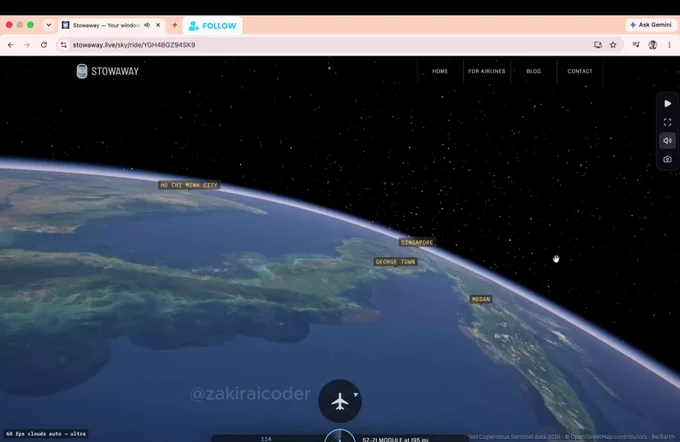
50 legendary internet rabbit holes you can spend hours exploring👇
1. zoom.earth — Watch the world via live satellite imagery
2. flightradar24.com — See every plane currently in the sky
3. marinetraffic.com — Track all ships at sea in real time
4. windy.com — Live map of winds and storms
5. lightningmaps.org — Watch lightning strikes hitting Earth in real time
6. earthquake.usgs.gov — Live list of recent earthquakes
7. submarinecablemap.com — Ocean cables carrying the internet
8. globalforestwatch.org — Watch forests disappear from space
9. worldometers.info — The world's statistics, second by second
10. internetlivestats.com — Current number of tweets and searches being posted
11. thetruesize.com — Compare the true sizes of countries
12. oldmapsonline.org — Maps from centuries ago
13. davidrumsey.com — Archive of 150,000 historical maps
14. openstreetmap.org — World map drawn by volunteers
15. window-swap.com — Look out the window of a random person around the world
16. virtualvacation.us — Virtual walks through cities
17. mapcrunch.com — Teleport to a random spot on Earth
18. atlasobscura.com — Catalog of the world's strangest places
19. neal.fun — Interactive knowledge experiences
20. htwins.net/scale2 — Scale journey from atom to universe (Updated HTML5 link)
21. eyes.nasa.gov — Explore the solar system in 3D
22. stellarium-web.org — Real sky map in your browser
23. apod.nasa.gov — NASA's astronomy picture of the day
24. images.nasa.gov — NASA's entire visual archive, free
25. pudding.cool — Visual articles told through data
26. ourworldindata.org — The state of the world with real data
27. gapminder.org — What we mistakenly think we know about the world
28. informationisbeautiful.net — Visualizing complex data
29. data.worldbank.org — World Bank's open data
30. data.tuik.gov.tr — Turkey's official statistics database
31. archive.org — Archive of millions of books, films, and software
32. gutenberg.org — 70,000 free books whose copyrights have expired
33. openlibrary.org — Record of every book in the world
34. loc.gov — U.S. Library of Congress digital archive
35. europeana.eu — Europe's cultural heritage archive
36. dp.la — America's digital library collection
37. artsandculture.google.com — Tour museums from home
38. rijksmuseum.nl — Download artworks in high resolution
39. wikiart.org — Archive of 250,000 artworks
40. publicdomainreview.org — Forgotten visual treasures of history
41. openculture.com — Free archive of culture and education
42. metmuseum.org — Met Museum's open collection
43. musicmap.info — Family tree of music genres
44. radiooooo.com — Pick a country and decade to listen to that era
45. listen.hatnote.com — Turn Wikipedia edits into audio
46. wikipedia.org — Random knowledge well
47. timeanddate.com — Time, sunrises, and sky events
48. sciencedaily.com — Live stream of science news
49. arxiv.org — Free preprints of scientific papers
50. observablehq.com — Visualize data with live code
Save this. You’ll definitely need some of these later. 🔖
Follow @Orion_Vers7x for more useful websites, AI tools & tech resources.
24
46
86
4,159
Rasel Hossen retweeted

Delete 99.8% of your online presence from the internet.
Here’s a step-by-step guide:
8
11
14
950
Rasel Hossen retweeted

🚨 Stop scrolling — you’re probably not using Google AI to its full potential.
Most people know 1–2 tools…
But there are 12 powerful (and FREE) Google AI tools that can 10x your productivity 👇
• Gemini → your AI brain for anything
• Veo 3 → turn text into videos
• NotebookLM → summarize anything instantly
• Google AI Studio → build & test AI ideas
• Firebase Studio → launch AI apps faster
• Gemini in YouTube → get instant video insights
• Nano Banana → edit images like magic
• Google Cloud Vision → analyze images with AI
• Gemini in Sheets → automate data & insights
• Imagen → create stunning AI visuals
• AppSheet → build apps without coding
• Gems → create custom AI assistants
This isn’t just tools.
This is your unfair advantage.
Most people will ignore this.
A few will use it and win.
Which one are you trying first? 👇

Your AI product deserves attention.
But attention is expensive…
Unless you play smarter.
OpenPedia AI Leaderboard 👇
• Pay for ranking
• Get seen instantly
• Compete in public
This is how modern growth works.
👉 Claim your position: openpedia.io
12
16
19
822