

Sharing insights Al | No-Code, Tech Tools & prompts | Content Creator | Education & Career Influencer | 📩 Email or DM Collaboration: raselhossen4504@gmail.com
Dhaka, Bangladesh
- Tweets 42,242
- Following 1,058
- Followers 5,789
- Likes 32,892









Pinned Tweet

You don't need 10 AI tools to create better content.
You only need 2:
🧠 Claude
🎨 Canva
Here's the workflow. 🧵👇

18
22
35
859
Rasel Hossen retweeted
You don't need 10 AI tools to create better content.
You only need 2:
🧠 Claude
🎨 Canva
Here's the workflow. 🧵👇
18
22
35
859
Rasel Hossen retweeted
The internet has hidden levels most people never explore.
You can:
1. Watch Earth change in real time
2. Follow planes across the planet
3. Track ships crossing oceans
4. Watch lightning strikes happen
5. Explore the universe in 3D
6. Travel through centuries-old maps
7. Visit museums from your bedroom
8. Read thousands of free books
9. Explore humanity through real data
10. Discover forgotten art & history
And this is just the surface.
The best part?
Most of these are completely free.
Save this thread. 🔖
Follow @Tech_AI_Rasel for more hidden websites, AI tools & tech resources.
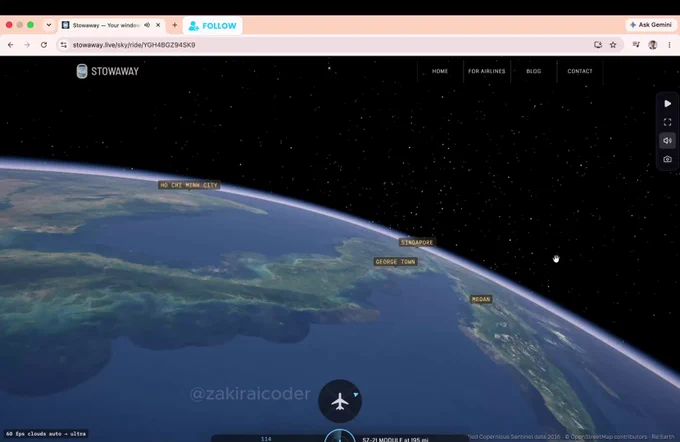
20
20
37
1,094
Rasel Hossen retweeted
You’re probably using AI wrong.
Most people treat AI like Google.
Here’s how to turn it into your personal productivity system. 🧵👇
1
1
3
114

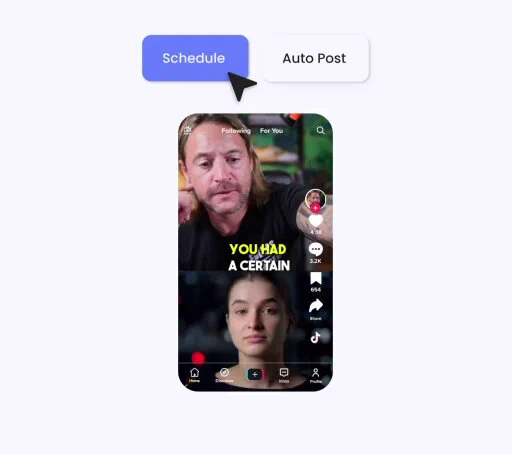
One piece of content ~ Multiple platforms ~ One streamlined workflow⚡
🎁FREE AI AUTOMATION WORKFLOW
Want to save hours every week on content creation?
I’m sharing this powerful workflow that helps you:👇
⚡ Create content once
🔄 Repurpose it across multiple platforms
📅 Automate scheduling & publishing
⏳ Save hours of repetitive work
Want the workflow?
1️⃣ Follow me @mostofakamal00
2️⃣ Like ❤️ this post
3️⃣ Repost 🔁
4️⃣ Comment “AI” below
I’ll share the workflow with selected participants. 🤖
Save this for later. 🔖
47
70
115
1,057
Rasel Hossen retweeted
One piece of content ~ Multiple platforms ~ One streamlined workflow⚡
🎁FREE AI AUTOMATION WORKFLOW
Want to save hours every week on content creation?
I’m sharing this powerful workflow that helps you:👇
⚡ Create content once
🔄 Repurpose it across multiple platforms
📅 Automate scheduling & publishing
⏳ Save hours of repetitive work
Want the workflow?
1️⃣ Follow me @mostofakamal00
2️⃣ Like ❤️ this post
3️⃣ Repost 🔁
4️⃣ Comment “AI” below
I’ll share the workflow with selected participants. 🤖
Save this for later. 🔖
47
70
115
1,057
🚨 I’VE BEEN USING iPHONES FOR YEARS.
And I still keep discovering features that completely change how I use them.
The funny part?
Most people never touch these settings.
Here’s my iPhone Power-User Playbook—features worth knowing before downloading another app. 🧵👇
01 — Back Tap
Turn the back of your iPhone into a shortcut.
Screenshot.
Open an app.
Run a shortcut.
Trigger an action.
Two taps can replace several steps.
02 — Live Text
See text in a photo?
Don’t type it manually.
Copy it.
Translate it.
Search it.
Call the number.
Open the address.
Your camera can become a text-recognition tool.
03 — Spotlight
Stop hunting through pages of apps.
Swipe down and search.
Apps, contacts, files, settings, calculations, conversions and more.
One search can replace several taps.
04 — Shortcuts
This is where iPhone starts feeling like an automation device.
Build workflows for repetitive actions instead of doing the same thing manually every day.
05 — Lock & Hide Apps
Some apps can be locked behind authentication, and supported apps can also be hidden.
Useful when privacy actually matters.
06 — App Privacy Report
Want to understand what your apps are doing?
Check the report.
It can show information about app activity and network domains accessed.
07 — Safety Check
Sharing your information with people or apps?
Review it.
Safety Check gives you a centralized way to review important sharing and access settings.
08 — Stolen Device Protection
Your passcode shouldn't be the only line of defense.
This feature adds additional protections for certain sensitive actions when your iPhone is away from familiar locations.
09 — Remove Photo Backgrounds
Press and hold a supported subject in a photo.
You can separate it from the background without opening a dedicated editing app.
Simple.
But surprisingly useful.
10 — Full-Page Screenshots
Need to save an entire webpage?
You don't always need 15 screenshots.
Use the full-page screenshot option where supported.
11 — Document Scanner
Notes isn't just for writing notes.
It can scan documents directly using your camera.
12 — Visual Look Up
Your camera can help identify supported objects, animals, plants, landmarks and more.
Another example of how much intelligence is already built into the phone.
13 — Focus Modes
Work mode.
Sleep mode.
Personal mode.
Different situations can have different notification and Home Screen setups.
14 — Accessibility Shortcuts
Accessibility isn't just for accessibility users.
Many of these tools can become powerful productivity shortcuts for anyone.
15 — Find My
Lost an Apple device or supported item?
Find My can help locate it.
Set it up before you need it — not after.
---
THE BIGGEST LESSON 👇
After using iPhones for years, I've learned one thing:
Buying better hardware doesn't automatically make you a power user.
Understanding the software does.
Before downloading another app, check:
→ Settings
→ Shortcuts
→ Privacy
→ Accessibility
→ Notes
→ Files
→ Find My
You may already have the tool you're looking for.
🔖 Save this. Explore these features one by one.
Follow @mostofakamal00 for practical AI, technology, workflows & useful digital tools.
44
83
135
2,419
Rasel Hossen retweeted
🚨 I’VE BEEN USING iPHONES FOR YEARS.
And I still keep discovering features that completely change how I use them.
The funny part?
Most people never touch these settings.
Here’s my iPhone Power-User Playbook—features worth knowing before downloading another app. 🧵👇
01 — Back Tap
Turn the back of your iPhone into a shortcut.
Screenshot.
Open an app.
Run a shortcut.
Trigger an action.
Two taps can replace several steps.
02 — Live Text
See text in a photo?
Don’t type it manually.
Copy it.
Translate it.
Search it.
Call the number.
Open the address.
Your camera can become a text-recognition tool.
03 — Spotlight
Stop hunting through pages of apps.
Swipe down and search.
Apps, contacts, files, settings, calculations, conversions and more.
One search can replace several taps.
04 — Shortcuts
This is where iPhone starts feeling like an automation device.
Build workflows for repetitive actions instead of doing the same thing manually every day.
05 — Lock & Hide Apps
Some apps can be locked behind authentication, and supported apps can also be hidden.
Useful when privacy actually matters.
06 — App Privacy Report
Want to understand what your apps are doing?
Check the report.
It can show information about app activity and network domains accessed.
07 — Safety Check
Sharing your information with people or apps?
Review it.
Safety Check gives you a centralized way to review important sharing and access settings.
08 — Stolen Device Protection
Your passcode shouldn't be the only line of defense.
This feature adds additional protections for certain sensitive actions when your iPhone is away from familiar locations.
09 — Remove Photo Backgrounds
Press and hold a supported subject in a photo.
You can separate it from the background without opening a dedicated editing app.
Simple.
But surprisingly useful.
10 — Full-Page Screenshots
Need to save an entire webpage?
You don't always need 15 screenshots.
Use the full-page screenshot option where supported.
11 — Document Scanner
Notes isn't just for writing notes.
It can scan documents directly using your camera.
12 — Visual Look Up
Your camera can help identify supported objects, animals, plants, landmarks and more.
Another example of how much intelligence is already built into the phone.
13 — Focus Modes
Work mode.
Sleep mode.
Personal mode.
Different situations can have different notification and Home Screen setups.
14 — Accessibility Shortcuts
Accessibility isn't just for accessibility users.
Many of these tools can become powerful productivity shortcuts for anyone.
15 — Find My
Lost an Apple device or supported item?
Find My can help locate it.
Set it up before you need it — not after.
---
THE BIGGEST LESSON 👇
After using iPhones for years, I've learned one thing:
Buying better hardware doesn't automatically make you a power user.
Understanding the software does.
Before downloading another app, check:
→ Settings
→ Shortcuts
→ Privacy
→ Accessibility
→ Notes
→ Files
→ Find My
You may already have the tool you're looking for.
🔖 Save this. Explore these features one by one.
Follow @mostofakamal00 for practical AI, technology, workflows & useful digital tools.
44
83
135
2,419

Paid vs Free AI Tools
1. Research
Paid: ChatGPT.com
Free: Deepseek.com
2. Video
Paid: HeyGen.com
Free: AirMore.ai
3. Watermark Removal
Paid: Fotor.com
Free: AirMore.ai
4. Image Generation
Paid: Midjourney.com
Free: Ideogram.ai
5. Presentation Tools
Paid: Beautiful.ai
Free: SlidesAI.io

35
126
260
9,925
Rasel Hossen retweeted
Paid vs Free AI Tools
1. Research
Paid: ChatGPT.com
Free: Deepseek.com
2. Video
Paid: HeyGen.com
Free: AirMore.ai
3. Watermark Removal
Paid: Fotor.com
Free: AirMore.ai
4. Image Generation
Paid: Midjourney.com
Free: Ideogram.ai
5. Presentation Tools
Paid: Beautiful.ai
Free: SlidesAI.io
35
126
260
9,925
Rasel Hossen retweeted

This Claude bot on Polymarket pulled $78,083 in 5 days.
Not built to be smart.
Built to be fast.
$7 → $3,595
$30 → $11,063
$142 → $13,356
$1,205 → $37,939
I spotted this wallet three days ago.
Spent 48 hours reverse‑engineering every trade.
Same markets. Same logic. Same loop.
Watch BTC price.
Compare to Polymarket odds.
Enter when they don’t match.
Exit when they do.
While you were analyzing — it was already compounding.
While you were deciding — it was already printing.
While you were sleeping — it was still running.
Most traders chase being right.
This bot just chases being faster.
$78K. Five days.
Claude. On repeat.
I don’t know who built it.
But I know how.
And it’s all in the article below.
Free for 24 hours.
To get it:
1. Comment " Code "
2. Like Retweet
3. Follow Me:👤
@sakhil_ai
(so I can DM ✉️you)
4. Don't forget to BOOKMARK!🔖

82
93
151
3,630
Rasel Hossen retweeted

BREAKING NEWS 🚨: ChatGPT can now redesign any room like a $150 per hour interior designer.
Upload one photo of your room and use these 7 prompts:
23
75
287
58,571
BREAKING NEWS 🚨: ChatGPT can now redesign any room like a $150 per hour interior designer.
Upload one photo of your room and use these 7 prompts:
23
75
287
58,571

📱 iPHONE 18 OR $2,000?
You can choose only one.
📱 iPhone 18
💵 $2,000 cash
What’s your pick?
💬 Comment below
🔁 Repost
👤 Follow @vikramverm25510
One winner will be selected randomly.

78
49
73
2,146
Rasel Hossen retweeted
📱 iPHONE 18 OR $2,000?
You can choose only one.
📱 iPhone 18
💵 $2,000 cash
What’s your pick?
💬 Comment below
🔁 Repost
👤 Follow @vikramverm25510
One winner will be selected randomly.
78
49
73
2,146

🚨 STOP SEARCHING FOR REMOTE JOBS IN THE SAME 3 PLACES.
LinkedIn, Indeed and Upwork aren't your only options.
Here are 30 platforms worth checking 👇
1. PowerToFly - Remote roles + diverse talent
powertofly.com
2. Remote Woman - Remote jobs curated for women
remotewoman.com
3. RemoteHub - Remote jobs across industries
remotehub.io
4. Remote Work Hub - Curated remote opportunities
remoteworkhub.com
5. Remote Jobs Club - Remote jobs + alerts
remotejobsclub.com
6. CloudPeeps - Freelance marketing/content work
cloudpeeps.com
7. WordPress Jobs - WordPress developer, design + support jobs
jobs.wordpress.net
8. Simply Communicate - Communications-focused jobs
simply-communicate.com/jobs
9. Virtual Assistant Jobs - Remote VA + admin opportunities
virtualassistantjobs.com
10. OutsourcingJobs.ph - Remote + outsourced opportunities
outsourcingjobs.ph
11. Remotive - Tech, marketing, sales, support + remote roles
remotive.com
12. Jobmote - Remote job discovery
jobmote.com
13. RemoteBaba - Remote opportunities across categories
remotebaba.com
14. Idealist - Nonprofit + social-impact jobs; filter by remote
idealist.org
15. RemoteJobr - Remote job listings
remotejobr.com
16. Jobscribe - Job discovery + alerts
jobscribe.com
17. Remote Hunt - Remote-first opportunities
remotehunt.com
18. Outsourcing Insight - Outsourcing + remote opportunities
outsourcinginsight.com
19. GoRemote - Remote job discovery
goremote.io
20. Dynamite Jobs - Remote startup + online-business jobs
dynamitejobs.com
21. The Muse - Jobs + company research; use its remote filter
themuse.com
22. Awesome Jobs - Remote opportunities
awesomejobs.io
23. TechJobs - Tech opportunities; search for remote roles
techjobs.com
24. Laravel Jobs - Laravel-specific developer jobs
jobs.laravel.io
25. Jobs in Pods - Jobs promoted through recruiting podcasts
jobsinpods.com
26. RubyNow - Ruby/Rails developer opportunities
rubynow.com
27. Remoters - Remote jobs + remote-work resources
remoters.net
28. Outsourcely - Connect with companies hiring remote talent
outsourcely.com
29. Crossover - Full-time remote roles + assessments
crossover.com
30. Remote Jobs - Remote opportunities across functions
remotejobs.com
💡 Don’t just mass-apply.
If you're applying for jobs in 2026, don't send another application before reading this 👇
drive.google.com/drive/folde…
Get hands-on with these courses for more skill upgrades:
1. Generative AI for Digital Marketing Specialisation
imp.i384100.net/7Xd0rO
2. Google Project Management Professional Certificate
imp.i384100.net/mO99a1
3. Entrepreneurship: Scaling & GTM Growth Strategy
imp.i384100.net/9V2dPQ
4. Copilot for Power BI
imp.i384100.net/vPe1Mv
5. Generative AI for Sales Professionals Specialisation
imp.i384100.net/N9AoLV
6. Generative AI for Data Scientists Specialisation
imp.i384100.net/MAaoOq
7. Generative AI for Software Developers Specialisation
imp.i384100.net/mOxrMM
8. Generative AI for Marketers Specialisation
imp.i384100.net/LKeo6M
9. Microsoft 365 Copilot for Leaders Specialisation
imp.i384100.net/xLAXM1
10. Microsoft Copilot: Your Everyday AI Companion Specialisation
imp.i384100.net/e1dJWO
11. Introduction to Microsoft 365 Copilot
imp.i384100.net/jeKDbP
12. Microsoft 365 Copilot: Personal Productivity for All
imp.i384100.net/kOLQ6L
Find role → tailor CV → build proof of work → find the hiring manager → reach out directly.
10 highly relevant applications > 100 random Easy Apply clicks.
Save this before your next job hunt. 🔖

21
22
61
1,890
Rasel Hossen retweeted
🚨 STOP SEARCHING FOR REMOTE JOBS IN THE SAME 3 PLACES.
LinkedIn, Indeed and Upwork aren't your only options.
Here are 30 platforms worth checking 👇
1. PowerToFly - Remote roles + diverse talent
powertofly.com
2. Remote Woman - Remote jobs curated for women
remotewoman.com
3. RemoteHub - Remote jobs across industries
remotehub.io
4. Remote Work Hub - Curated remote opportunities
remoteworkhub.com
5. Remote Jobs Club - Remote jobs + alerts
remotejobsclub.com
6. CloudPeeps - Freelance marketing/content work
cloudpeeps.com
7. WordPress Jobs - WordPress developer, design + support jobs
jobs.wordpress.net
8. Simply Communicate - Communications-focused jobs
simply-communicate.com/jobs
9. Virtual Assistant Jobs - Remote VA + admin opportunities
virtualassistantjobs.com
10. OutsourcingJobs.ph - Remote + outsourced opportunities
outsourcingjobs.ph
11. Remotive - Tech, marketing, sales, support + remote roles
remotive.com
12. Jobmote - Remote job discovery
jobmote.com
13. RemoteBaba - Remote opportunities across categories
remotebaba.com
14. Idealist - Nonprofit + social-impact jobs; filter by remote
idealist.org
15. RemoteJobr - Remote job listings
remotejobr.com
16. Jobscribe - Job discovery + alerts
jobscribe.com
17. Remote Hunt - Remote-first opportunities
remotehunt.com
18. Outsourcing Insight - Outsourcing + remote opportunities
outsourcinginsight.com
19. GoRemote - Remote job discovery
goremote.io
20. Dynamite Jobs - Remote startup + online-business jobs
dynamitejobs.com
21. The Muse - Jobs + company research; use its remote filter
themuse.com
22. Awesome Jobs - Remote opportunities
awesomejobs.io
23. TechJobs - Tech opportunities; search for remote roles
techjobs.com
24. Laravel Jobs - Laravel-specific developer jobs
jobs.laravel.io
25. Jobs in Pods - Jobs promoted through recruiting podcasts
jobsinpods.com
26. RubyNow - Ruby/Rails developer opportunities
rubynow.com
27. Remoters - Remote jobs + remote-work resources
remoters.net
28. Outsourcely - Connect with companies hiring remote talent
outsourcely.com
29. Crossover - Full-time remote roles + assessments
crossover.com
30. Remote Jobs - Remote opportunities across functions
remotejobs.com
💡 Don’t just mass-apply.
If you're applying for jobs in 2026, don't send another application before reading this 👇
drive.google.com/drive/folde…
Get hands-on with these courses for more skill upgrades:
1. Generative AI for Digital Marketing Specialisation
imp.i384100.net/7Xd0rO
2. Google Project Management Professional Certificate
imp.i384100.net/mO99a1
3. Entrepreneurship: Scaling & GTM Growth Strategy
imp.i384100.net/9V2dPQ
4. Copilot for Power BI
imp.i384100.net/vPe1Mv
5. Generative AI for Sales Professionals Specialisation
imp.i384100.net/N9AoLV
6. Generative AI for Data Scientists Specialisation
imp.i384100.net/MAaoOq
7. Generative AI for Software Developers Specialisation
imp.i384100.net/mOxrMM
8. Generative AI for Marketers Specialisation
imp.i384100.net/LKeo6M
9. Microsoft 365 Copilot for Leaders Specialisation
imp.i384100.net/xLAXM1
10. Microsoft Copilot: Your Everyday AI Companion Specialisation
imp.i384100.net/e1dJWO
11. Introduction to Microsoft 365 Copilot
imp.i384100.net/jeKDbP
12. Microsoft 365 Copilot: Personal Productivity for All
imp.i384100.net/kOLQ6L
Find role → tailor CV → build proof of work → find the hiring manager → reach out directly.
10 highly relevant applications > 100 random Easy Apply clicks.
Save this before your next job hunt. 🔖
21
22
61
1,890

Meet Higgsfield × FLUX 3 Image.
With Black Forest Labs' new image model, you can:
> edit one detail without touching the rest
> place objects with bounding boxes
> combine up to 10 references
> generate in up to 4K
Available now on Higgsfield.

66
220
790
59,901
Rasel Hossen retweeted
Meet Higgsfield × FLUX 3 Image.
With Black Forest Labs' new image model, you can:
> edit one detail without touching the rest
> place objects with bounding boxes
> combine up to 10 references
> generate in up to 4K
Available now on Higgsfield.
66
220
790
59,901
